
USABILITY TESTING
for PeopleSoft Cloud Manager
After creating major user flows for Cloud Manager with major stakeholders involved, usability testing session was conducted with the actual end users at 'Sangam 2016', an Oracle Users Group Conference in India.
THE GOAL
I wanted to capture user feedback on the new PeopleSoft Cloud Manager for Self Service Provisioning flow (live).
Cloud Manager with Oracle Cloud enables even non-technical users to self-provision environments in minutes – saving you money. Hence it was the perfect flow to test the self service provisioning flow with end users at the Oracle Users Group conference.
I wanted to observe how easy it was for the participants (end users) to provision an environment and completed related tasks. I wanted to identify any issues pertaining to navigation, interaction, readability and visual design and provide recommendations to address the issues.
TIMELINE
MAKE OF THE TEAM
2 weeks
Senior UX Manager and Interaction designer (myself)
KEY GOAL
Capture user feedback on the new PeopleSoft Cloud Manager for Self Service Provisioning flow.
THE PROCESS
Preparation is the key for usability testing. My role was to conduct the usability sessions and also take notes.
Pre Preparation
Before visiting our users, it was very important to decide what is it exactly that we wanted to test. Hence, to stay in focus and to keep the testing streamlined, I created a plan which had the following steps for Usability testing process.
Create
Test Plan
-
Identify Objectives
-
Create Test script
-
Recruit Users
Facilitate
the Test
-
Observe Users
-
Identify issues
-
Interview Users
Analyze
Case Data
-
Assess User behaviour
-
Analyse User Click path
-
Assess navigation
Create
Test Report
-
Review video footage
-
Identify design issues
-
Provide recommendations
BREAKING DOWN THE PROCESS
Once the scope of work was defined for the Usability test, I created the testing script template.
Creating Test plan
I decided on the areas to test for the self service provisioning flow and listed 7 tasks to test. We had selected 9 participants for the tests.Users were asked to perform the following tasks without assistance:
1.Create a new environment.
2.Check if database, appserver and webserver are up and running.
3.Access the PIA.
4.Find required information to access app designer.
5.Restart the environment.
6.Take backup of environment.
7.Delete environment.
The testing script covered the questions and topics we wanted to cover. Below is the screenshot for the same.

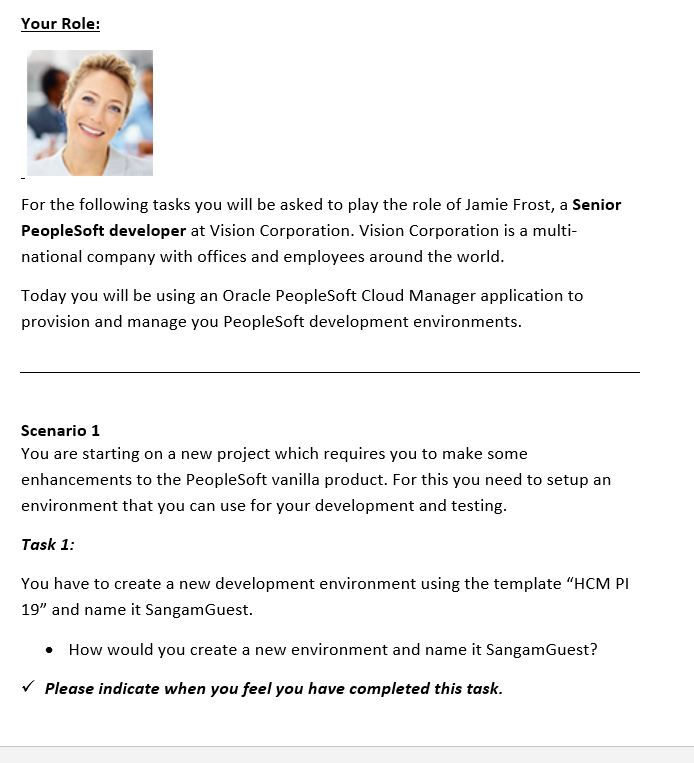
Testing script preview
Facilitating Test
We had the live prototype checked and ready for the test. Once user sessions started, I explained the agenda for the session and made sure to put them at ease by initiating the conversation with general questions like
-
How are you? Please tell us briefly about your role in your organization.
-
As an employee what are the top 5 tasks that you perform?
-
Which tablet do you use? What are the top 5 things you do using your tablet.
After, they were comfortable in having a conversation, I showed them the screens and explained them the tasks I would like them to perform. I asked them to pick up an actual task from their day and see if our product can be of any help to them. I encouraged them to think aloud and also asked for their permission to record the session.
Once they started, it was like a conversation where they were asking questions, talking about their decisions, what they liked, what they were expecting and so on.
I was sitting next to the user and was taking notes along with assisting them with their queries. Whole session was recorded as well.
At the end of the session, we gave the users small gifts for their active participation and valuable feedback.
Analyzing Case Data
After all our testing sessions, I went through my notes and the videos captured to analyse the information and derive conclusions. The same was then presented to the whole team back at the office for the next step.

Creating Test Report
A test report was created after the usability testing containing the following sections:
-
Background summary: Brief summary of what we tested, the testing team, the material that was utilized and a brief description of all findings, the goal of the session.
-
Methodology: how the sessions were done, the tasks or scenarios that were tested, the metrics selected and a brief description of each segment of users.
-
Test results: summarize all the results from the metrics chosen.
-
Findings and recommendations: List all findings (positives and negatives). Positive findings helped us to know that we are on the right track, for negative finding I provided recommendations to solve them.
Below is the screenshot of the same:


TITLE OF THE CALLOUT BLOCK
LESSONS LEARNED
The whole exercise was very helpful to know how users perceive and use this product.
This also helped us verify our goals and it was great to see how users appreciated the new product being a huge time saver for the provisioning tasks they perform daily for their work. They were keen on using the product and found the user experience intuitive.
The user feedback also helped us polish the product UI for the next release.